September 2026
Overview
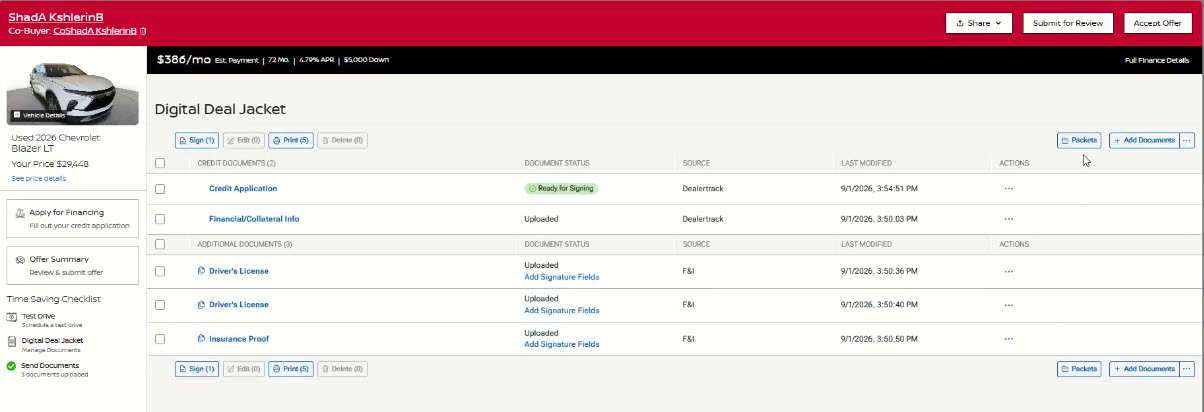
Adding dealership document packets is now faster and easier in Digital Deal Jacket (DDJ). The new Packets button puts your dealership’s pre-built document packets front and center when you enter DDJ, making it easier to find, review, and add the documents you need. You can preview packet contents before adding them and add an entire packet to a deal in a single action. Available in both Manager View and Sales View.
What’s Improved:
You can now access Dealer Packets directly from the DDJ action bar, making it easier to find, review, and add dealership forms without first opening the document drawer.
- New Packets button provides direct access to dealership document packets when entering DDJ.
- Preview packet contents before adding so you can confirm the included forms before taking action.
- Add an entire packet in a single action without adding forms individually.
- Search for packets to quickly find the packet you need.
- Duplicate forms are automatically skipped when the same document exists in multiple packets.
- Clear confirmation messages show which documents were successfully added and highlight any exceptions that may require attention.
How It Works
Add a Dealer Packet to a Deal
- Open Digital Deal Jacket (DDJ).
- Select the Packets button in the top action bar.
- Browse or search available packets.
- Select a packet to preview the included documents.
- Review the selected forms.
- Click Add to add the packet documents to the deal.
- Review the confirmation message and continue working the deal.