September 2026
Overview
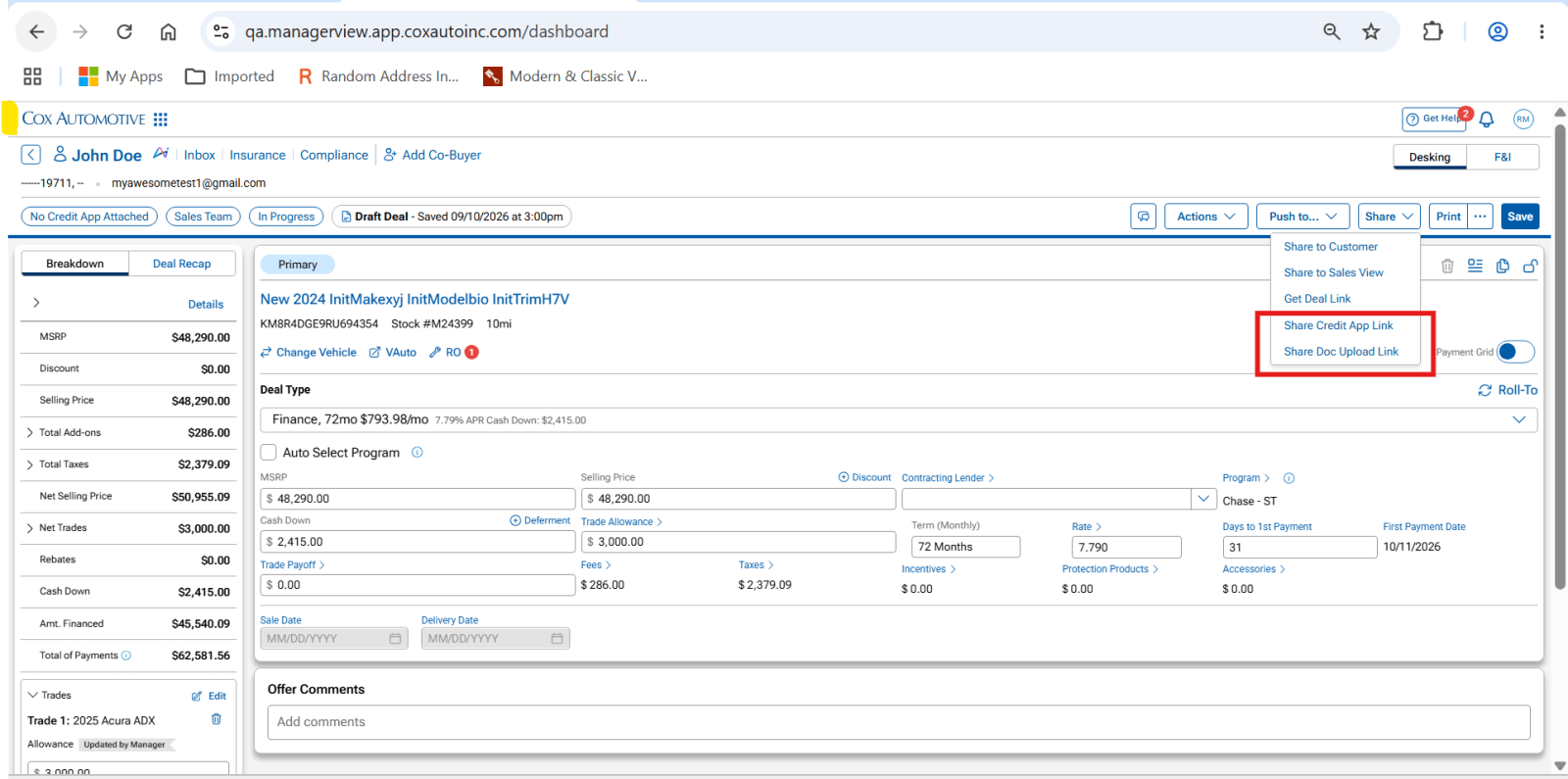
Sending customer-facing links from Manager View is now simpler. Credit application and document upload links are available directly from the existing Share menu, giving you one place to access customer sharing actions. The links work the same way they did before, but you no longer need to open the Deal Progress panel to find them.
What’s Improved
You can now access all customer-sharing actions from a single location in Manager View.
What’s new:
- Share Credit App Link
- Share Doc Upload Link
These options have been added to the existing Share menu alongside:
- Share to Customer
- Share to Sales View
- Get Deal Link
This creates one consistent place to send customer-facing links while keeping your workflow inside the Share menu. All other deal activities remain available from their existing locations within the deal.
How It Works
Share a Credit App or Document Upload Link
- Open a deal in Manager View.
- Select Share.
- Choose Share Credit App Link or Share Doc Upload Link.
- Send the link to your customer.
The sharing process remains the same. Only the location of these actions has changed.