September 2026
Overview
Editing forms in Digital Deal Jacket is now a more connected experience. The Form Editor opens directly within the deal, helping users stay in their workflow while updating documents and moving seamlessly to signing.
Previously, editing a document opened a separate browser tab and added extra steps between document updates and signature collection. With the new Save and Sign experience, users can move directly from bulk editing to signing without additional navigation.
What’s Improved
Edit Forms Without Leaving Digital Deal Jacket
The Form Editor now opens directly within Digital Deal Jacket, helping keep users focused on the deal while updating documents.
- Edit documents without opening a new browser tab
- Stay within the Digital Deal Jacket workflow
- Return directly to the deal after completing edits
Save and Close for Individual Edits
When editing a single document, users can save changes and close the editor without leaving additional browser tabs open.
- Save document updates and return directly to the deal
- Close the editor automatically after saving
- Eliminate extra tabs that need to be manually closed
Save and Sign for Bulk Edits
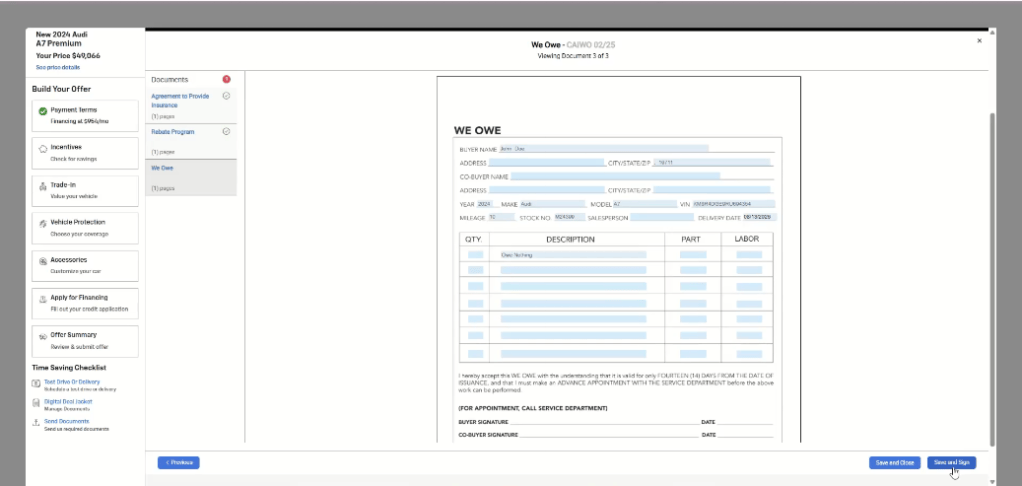
On the final page of a bulk edit, users can now select Save and Sign.
- Move directly from editing documents to signing
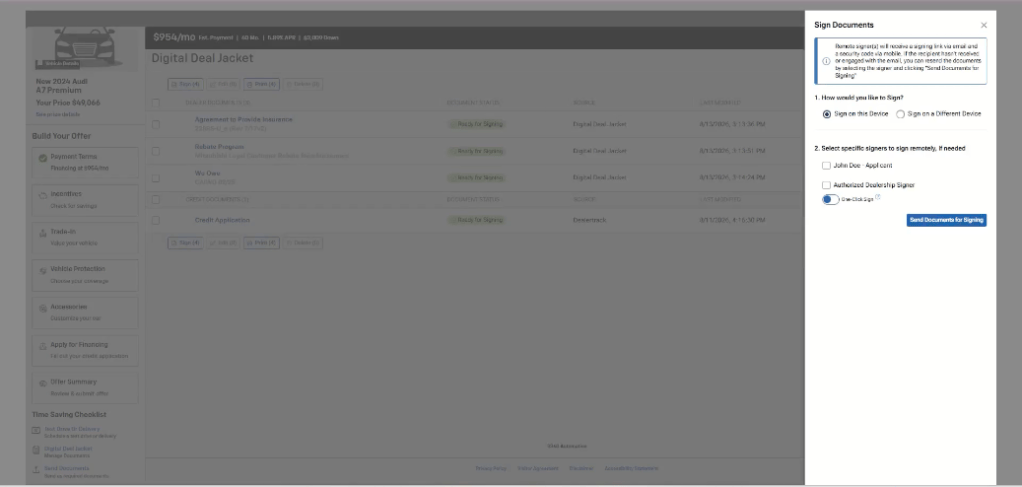
- Automatically launch the signing experience
- Use documents already included in the deal package
- Eliminate an additional document-selection step
How It Works
Editing a Single Document
- Open a form from Digital Deal Jacket.
- Make the necessary updates.
- Select Save and Close.
- Return directly to the deal.
Editing Multiple Documents
- Start a bulk edit from Digital Deal Jacket.
- Update documents as needed.
- On the final document, select Save and Sign.
- Return to Digital Deal Jacket and begin signing immediately.