
September 2026
Overview
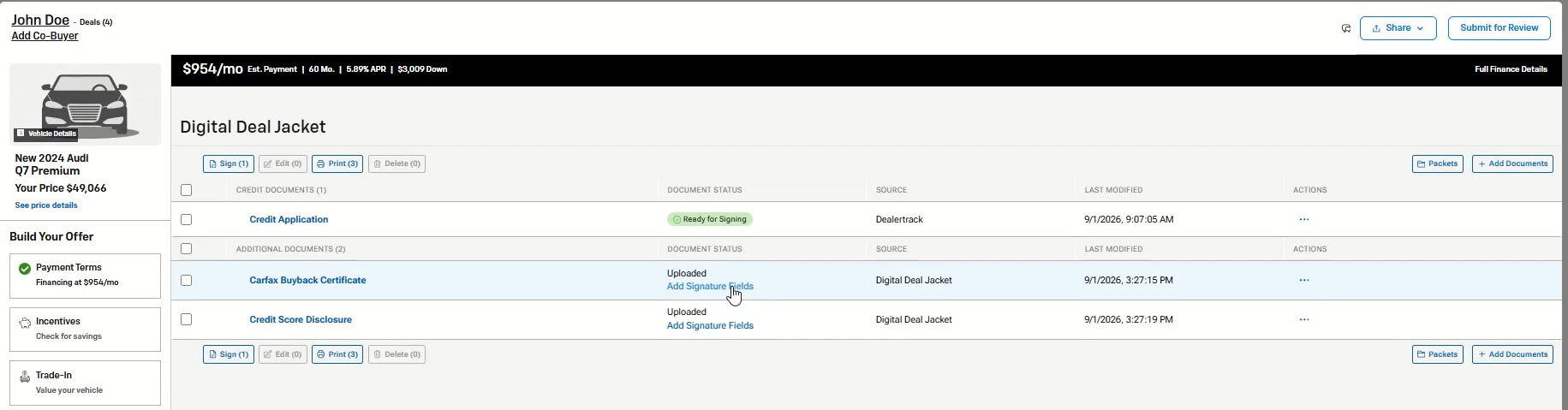
You can now add signature, date, and initials fields directly to uploaded and image-captured documents in Digital Deal Jacket (DDJ) without leaving Deal Central. ReadySign allows dealership users to prepare documents for signing directly within DDJ and send them for signing when ready. You can also save signature field layouts as reusable templates and apply them to future documents of the same type, helping streamline preparation for recurring paperwork.
Key enhancements include:
- Add signature, date, and initials fields directly to uploaded and image-captured documents.
- Prepare documents for signing regardless of deal stage or contract status.
- Edit, move, resize, or remove signature fields before signing begins.
- Save signature field layouts as reusable templates for recurring document types.
- Apply saved templates to future documents in a single action.
- Send documents for signing through DDJ or Dealertrack F&I.
- Signature fields automatically lock once signing begins to maintain document integrity.
How It Works
- Open an uploaded or image-captured document in Digital Deal Jacket (DDJ).
- Select Add Signature Fields.
- Place signature, date, and initials fields where needed.
- Save the document and send it for signing when ready.
Reuse Signature Layouts with Template: If you regularly use the same document type, you can save your signature field layout as a template and apply it to future documents with a single click. Templates can be updated, reused, or skipped as needed.
Additional Information
- Access to DDJ within Deal Central and User must have DDJ Edit permissions to see and use the Add Signature Fields option.
- ReadySign currently supports uploaded and image-captured documents.
- Once signing begins, signature fields can no longer be added, edited, or removed.